


What Is RAG? The Building Block for Using AI Properly in Your Business
Every business leader has had the same experience with AI by now. You ask ChatGPT or Claude a question about your own company, your clients, your pricing, your past projects, and it either makes something up or politely tells you it has no idea.
That's not a flaw in the AI. It's a flaw in how it's connected to your business. Which is to say: it isn't.
Retrieval-Augmented Generation, or RAG, is the architecture that fixes this. It's the difference between an AI that gives generic advice and an AI that actually knows your work. And if you're serious about using AI in your company beyond one-off chat sessions, RAG is the foundation everything else gets built on.
What RAG Actually Is
RAG connects a large language model (like Claude or GPT) to a private, structured knowledge base of your company's documents. Instead of relying only on what the model learned during training, it looks up real, current, proprietary information at the moment you ask a question.
Think of it as giving the AI a searchable filing cabinet full of your company's documents, then letting it read the relevant files before answering.
Out of the box, AI models have three limitations that make them unreliable for business use:
- They only know their training data. Nothing proprietary, nothing recent, nothing about you.
- They hallucinate. When asked about specifics they don't know, they guess confidently.
- They have no memory of your business. Your clients, pricing, processes, and past work don't exist to them.
RAG solves all three by grounding every answer in documents you control. When you ask "what did we scope for projects like this last year," the system retrieves your actual past scopes and answers from those, with sources. Not a guess. A lookup.
Importantly, RAG doesn't retrain or fine-tune the model. It retrieves context at the moment of the question. That means your knowledge base can be updated instantly (add a document, it's queryable minutes later) without any expensive model work.
How It Works, in Plain English
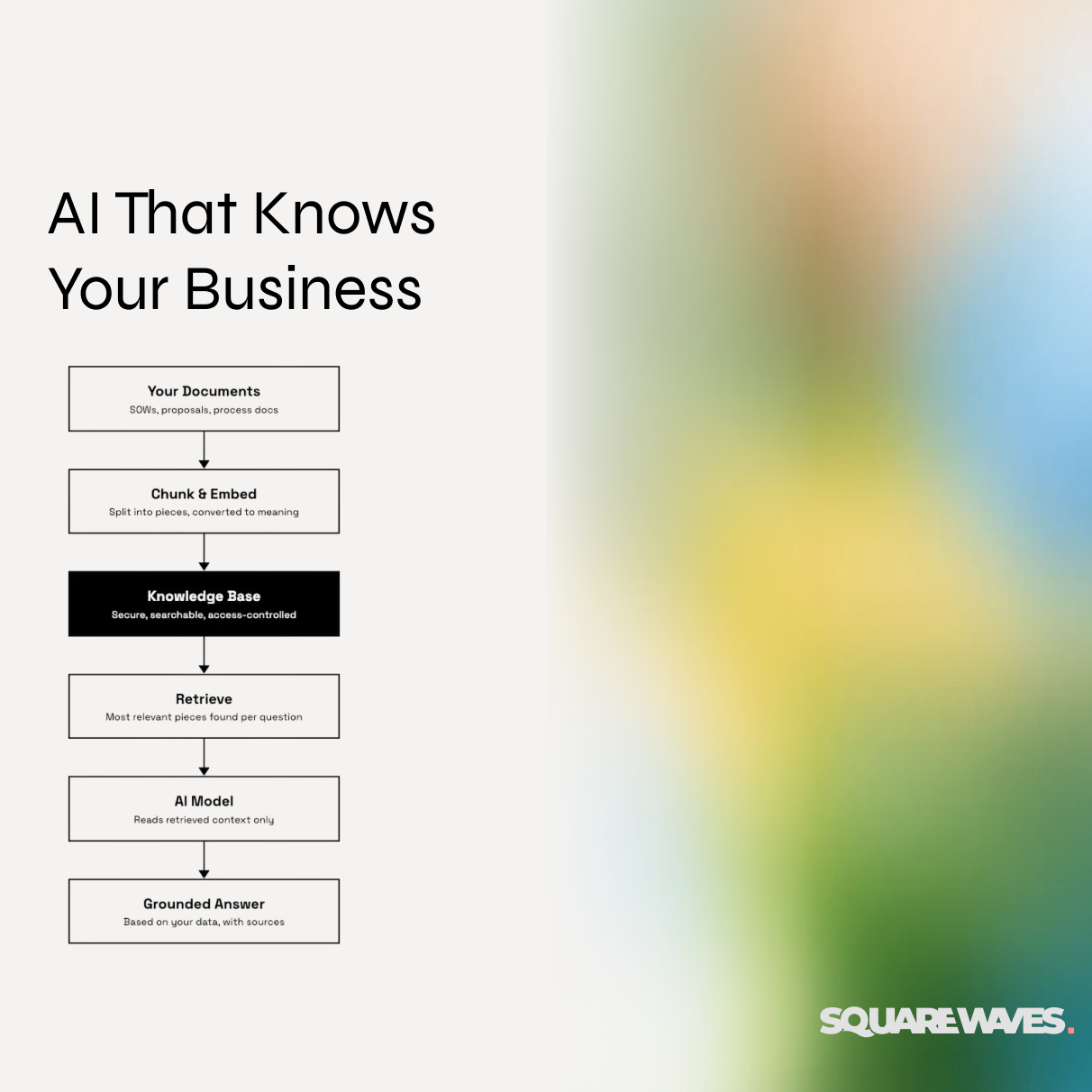
The pipeline has a handful of steps, and each one matters:
- Ingest. Documents (PDFs, proposals, SOWs, process docs) are converted into clean, structured text.
- Chunk. Long documents are split into smaller, meaningful pieces, since the AI retrieves passages, not whole binders.
- Embed. Each piece is converted into a numerical representation of its meaning, so the system can find content that's conceptually similar to a question, not just keyword matches.
- Store. Everything lives in a database you control, tagged with metadata: client, project type, industry, date, sensitivity level.
- Retrieve and answer. When someone asks a question, the system finds the most relevant pieces and hands them to the AI, which answers using only that grounded context.
That's it. The magic isn't in any one step. It's in doing all of them with discipline.
Why "Enterprise" RAG Is Different: Structure and Security
Here's what most DIY AI experiments get wrong: they treat the knowledge base as a dumping ground. Every file goes in, everyone can query everything, and six months later you have a system that leaks sensitive information and returns stale, contradictory answers.
A business-grade RAG system is defined less by its AI and more by its governance. Three principles matter most.
1. Some things must never go in.
Before a single document is indexed, you need a hard exclusion list. Ours includes financial records and invoices, personally identifiable information, personnel files and salaries, credentials of any kind, privileged legal communications, NDA-protected client materials, and unsigned draft contracts. An automated classification step should screen every incoming document against these rules and reject anything that trips them, with a human reviewing the flags.
2. Everything that does go in gets a sensitivity level.
Not all safe-to-index documents are equal. A public-facing process doc is different from a client-specific scope with named parties and budgets. A tiered model (low, medium, high) determines who can retrieve what. Low-sensitivity content is available to the whole team. Medium requires elevated roles. High never enters the system at all.
3. Security is enforced at every layer, not just the chat window.
A knowledge base is only as secure as its most permissive layer. Locking down the AI interface while leaving the underlying database open isn't security, it's theater. Real enforcement means: single sign-on with role-based access, database-level rules that restrict which records each role can even query, API keys stored properly and rotated on a schedule, encryption in transit and at rest, and audit logs of every document ingested and every question asked.
One more thing worth asking your AI vendors directly: what happens to your data on their side. Major providers offer commercial terms where your API data isn't used for training, and some offer zero-retention arrangements for organizations that need them. These are contractual arrangements to set up deliberately, not checkboxes to assume.
How to Actually Build One
The good news: this is no longer a six-month enterprise IT project. A focused build for a mid-market company follows five phases, each producing something testable:
- Foundation. Stand up the database with vector search, write the access rules, and prove you can store and retrieve a single document correctly.
- Extraction and classification. Build the pipeline that turns messy PDFs into clean text and automatically tags each document with client, project type, and sensitivity.
- Automation. Wire it together so that dropping a document into a designated folder triggers the whole pipeline, including the rejection path for sensitive material.
- The query layer. Connect the knowledge base to your AI tool of choice so your team can ask plain-English questions and get grounded, cited answers. (This is where standards like MCP, Anthropic's protocol for connecting tools and data to Claude, make integration far cleaner than it was even a year ago.)
- Backfill and governance. Bulk-load your historical documents, validate the tagging, assign sensitivity levels, and write down who owns the system going forward.
That last part matters more than people expect. A RAG system needs light but real maintenance: reviewing rejected documents, spot-checking answer quality monthly, rotating credentials quarterly, and archiving stale documents so old information doesn't pollute new answers.
What You Can Do Once It's Built
This is the part that changes how you think about AI in your company. Once your knowledge is structured, secured, and queryable, the chat interface is just the first application. The knowledge base becomes infrastructure, and you build on top of it.
Institutional memory that survives turnover. "How did we handle onboarding for clients like this?" gets answered from your actual history, not from whoever's been around longest.
Faster, more consistent scoping and proposals. Pull pricing patterns, scope language, and deliverable lists from every comparable project you've ever done, in seconds.
Onboarding new hires in weeks, not months. New team members can ask the system the questions they'd otherwise interrupt a senior person to ask.
AI agents and automations with real context. An automation that drafts a proposal, triages a client email, or preps a meeting brief is only as good as what it knows. Connected to your knowledge base, those workflows run on your actual data instead of guesses.
Custom software and client-facing tools. Internal dashboards, client portals, and reporting systems can all query the same knowledge layer. You build the foundation once and every future tool inherits it.
That's the real point. RAG isn't a chatbot feature. It's the data layer that makes every other AI investment in your company actually work. Companies that skip this step end up with a collection of disconnected AI experiments. Companies that build it end up with a compounding asset.
Where to Start
You don't need to boil the ocean. Start with one high-value document type (past scopes and proposals are usually the winner), define your exclusion rules before you ingest anything, and get the security model right on day one. It's far easier to build governance in than to retrofit it after sensitive data has already leaked into an index.
If you'd like help thinking through what this looks like for your business, that's exactly the kind of systems work we do.
Related
Articles
Readers always have access to latest trends and perspectives.
.avif)

.avif)


